https://youtu.be/p6pYPRXRWF0 Schedule a Free Demo Book Your Free Consultation Claim Your Free App Strategy Call TALK TO AN EXPERT
Mobile apps are no longer a luxury. They are essential for growth, digital strategy, and long-term user engagement. Yet despite how common apps have become, one simple question still causes confusion for startups and established companies alike: "How much does it actually cost to develop an app?"
If you're a CEO, CTO or product owner you’ve probably found yourself lost between online calculators and blog posts with vague pricing ranges and maybe even sales calls that never give you the full picture. The truth is, mobile app pricing in 2025 is complex, but it doesn’t have to be a black box.
This guide is designed to walk you through all the variables that determine app development costs, help you make smarter budgeting decisions and introduce strategies and frameworks used by experienced teams. By the end, you should be able to create a rough, informed estimate for your own app, or at least ask the right questions to your dev team or agency!
Let’s dig in.
Table of Contents
App Pricing in 2025: Why There’s No One-Size-Fits-All Answer
Why Google Can’t Tell You What Your App Will Cost
Search engines can offer ballpark figures, but they can't account for your product's unique vision. Your tech stack, features, team structure, long-term goals, and even launch region impact total cost. Real estimates need real context.
Pricing calculators can be a good place to start, but they tend to oversimplify things. For example, checking a box for “chat functionality” won’t capture the difference between a static message board and a real-time, encrypted chat system with read receipts and offline support.
The bottom line? The more detail you can provide early on, the more accurate your cost estimation will be.
This Guide Will Help You Budget Like a Pro, Not Just a Buyer
We’ll help you break down the components of app pricing and guide you through scope-based estimation. We’ll also show how decisions about platform, features, design, and post-launch support can dramatically shift your budget, for better or worse.
First steps for You:
Write down the top 3 features your app must include at launch. Next to each, list whether they require:
- Real-time data?
- User login/authentication?
- Integration with another system (e.g. Stripe, Salesforce)?
This simple inventory is the starting point of your scope and budget. Keep the questions handy since they will be answered along the way throughout this guide.
App Cost Tiers in 2025: MVP? Enterprise Platforms?
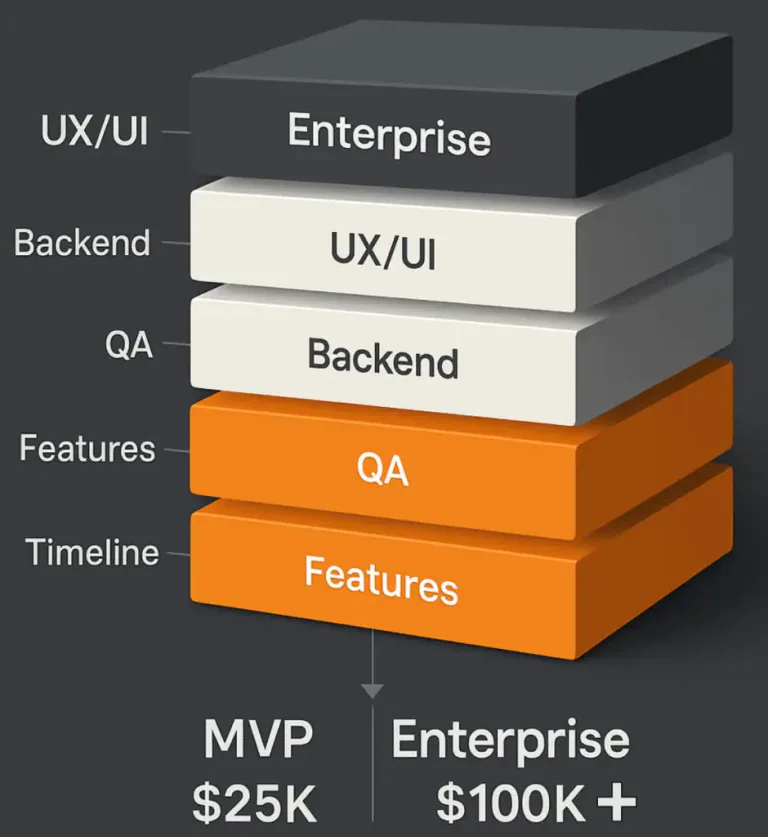
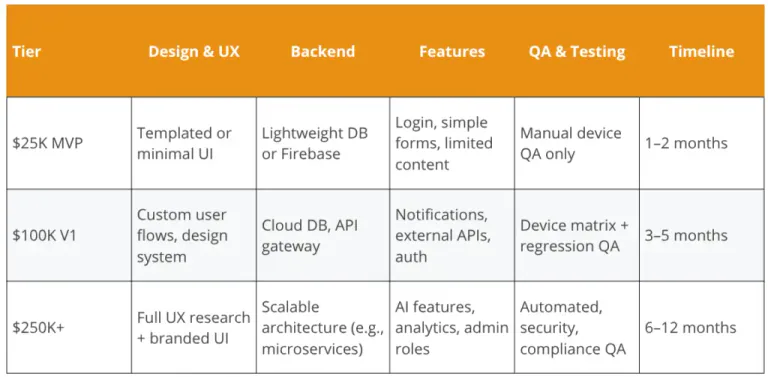
What $25K, $100K, and $250K Apps Look Like
To help you frame your expectations, here’s a simple breakdown of what’s typically achievable at three different investment levels:
- $25K - Lean MVP: A limited prototype or internal-use app. Single platform only, minimal backend logic and a templated UI. Usually focused on proving if a product is a good fit for the market or for testing a business hypothesis.
- $100K - Scalable V1: Designed for external launch, these apps include real-time features, custom UI, multi-platform deployment, and integration with third-party tools like analytics or payments. They can handle higher user traffic and offer room for scalability.
- $250K+ - Enterprise App: Complex apps for regulated industries or consumer-grade experiences at scale. They may include machine learning, offline functionality, role-based access controls, robust security protocols, and in-house CMS or dashboards.
Real Examples: Scope Breakdown by Tier
Reflect on these questions:
Based on your feature set and timeline, which tier feels most realistic for your app idea today? Which tier would your ideal product fit into long-term?
What Determines Mobile App Development Cost?
Platform: iOS vs Android vs Cross-Platform
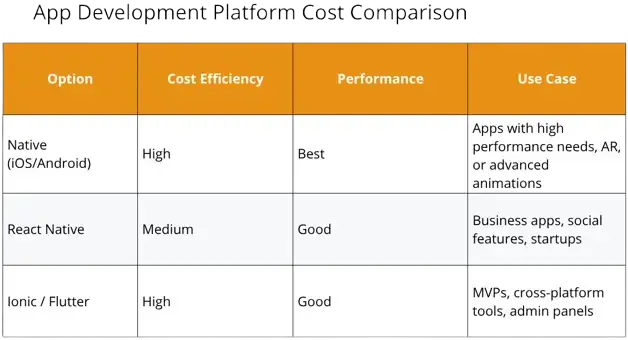
Your choice of platform plays a critical role in cost. Native apps are written separately for iOS (Swift) and Android (Kotlin), which offers optimal performance and better OS integration, but also double your development time and testing.
Cross-platform solutions like Ionic (our specialty), React Native, and Flutter allow developers to build one shared codebase for both platforms, reducing the time needed to launch and cost significantly.
Here’s how the platforms stack up:
Ask yourself:
Will your app require access to device hardware (e.g., camera, sensors)? Will it need to work offline? These are clues about whether native may be necessary.
Feature Complexity and Integrations
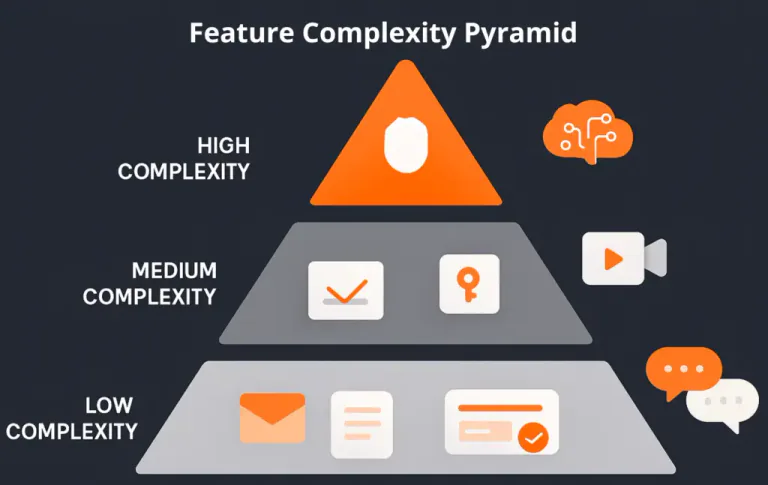
You can think of app features in three buckets:
- Static screens
- Content display
- Basic forms
- Contact forms
- User authentication
- Push notifications
- Search filters
- Payment gateway integration
- Video/audio streaming
- Real-time chat
- AI features
- Role-based dashboards
- Offline data sync
- Low Complexity:
- Medium Complexity:
- High Complexity:
Each added layer not only adds development hours but also increases the QA, UX planning and backend infrastructure requirements.
UX/UI, Security, QA, Maintenance
Design is often underestimated. UX/UI design in 2025 involves responsive layouts and accessibility compliance that scale across platforms. Strong design is not just aesthetic, it’s actually critical to usability and brand perception.
Expect to allocate 15% - 30% of your total budget to UX/UI. A good design process includes:
- Persona development
- User flows
- Wireframes
- Interactive prototypes
- User testing
Security and QA are non-negotiable, especially if your app handles sensitive data like PII and healthcare info. Automated testing, multi-device testing is standard in robust app builds.
Did You Know?
Apps with strong QA pipelines experience 50% - 80% fewer production bugs, saving tens of thousands in post-launch firefighting costs.
Would you like a custom app development? Let’s talk
How to Reduce App Costs Without Sacrificing Quality
Start With a Lean MVP Strategy
Trying to build everything in version 1 is one of the most common mistakes. A lean MVP lets you:
- Launch sooner
- Validate market fit
- Minimize risk
- Focus resources on features that matter
Start Strategizing
Use a method like MoSCoW (Must-have, Should-have, Could-have, Won’t-have) to prioritize features. Let’s say you’re building a fitness tracking app for beginner runners. Here’s how you might break features down using the MoSCoW method:
- User sign-up/login with email or Google
- Daily step count and GPS run tracking
- View past runs and calories burned
- Basic settings for units and notifications
- Social sharing of completed runs
- In-app goal setting and progress tracker
- Integration with Apple Health or Google Fit
- Voice coaching during runs
- Challenges between friends
- Custom workout plan generator
- Wearable device syncing (e.g., Apple Watch)
- AI-based coaching recommendations
- Nutrition tracking and meal logging
- Must-have
- Should-have
- Could-have
- Won’t-have (for now)
By using this framework you can stay focused on what’s critical for version 1 and still leave room for brainstorming ideas for future iterations.
Choose the Right Tech Stack (Flutter, React Native, etc.)
Using a modern tech stack that supports modularity and scalability helps avoid technical debt. We recommend:
- Frontend: Ionic, React Native, Flutter
- Backend: Firebase, Node.js + Express, Hasura, AWS Lambda
- Database: PostgreSQL, MongoDB, Firebase Firestore
Not a tech person? Think of your tech stack like the foundation and framing of a house. If you use modern, well-supported materials like steel beams and good insulation, it’s easier to renovate or fix things later without tearing down entire walls. But if you build with outdated materials or custom-fabricated parts that only one person knows how to fix, you’ll pay more in the long run for every little change.
A good tech stack lets developers plug in new features and adapt to new platforms without starting from scratch. It’s the difference between a custom home with a blueprint and a DIY shack that collapses when the wind changes. It’s a good idea to involve a tech person or developer when thinking about this.
Tip:
Tools like Supabase or Firebase can dramatically reduce backend setup time, making them great for MVPs.
How to Work With an App Development Partner Efficiently
How you collaborate with your app development team is just as important as what you build.
Be proactive:
Set yourself up for success by:
- Assigning a single product owner internally
- Committing to regular sprint reviews
- Prioritizing feedback and decision-making agility
No AI chatbot app is perfect on launch day. Conduct functional testing (does it work?), usability testing (is it intuitive?), and NLP testing (does it understand intent?). Use metrics like fallback rate, user drop-off, or time-to-resolution to refine your model iteratively.
Cleveroad recommends continual improvement cycles post-launch to keep pace with changing user expectations and domain-specific vocabulary.
Let’s explore how to bring your app to life, custom, scalable, and future-ready.
What’s Really Included in the Cost to Build an App?
Beyond Code: The Hidden App Development Costs Third-party integrations
Beyond development, successful apps include:
- Hosting and cloud infrastructure: $500 - $5,000/month depending on usage
- 3rd-party tools: Stripe, Twilio, Firebase, Google Maps. Each has tiered pricing
- App Store Optimization (ASO): To compete in crowded app marketplaces
- Analytics and CRM: Tools like Mixpanel, Segment, or HubSpot
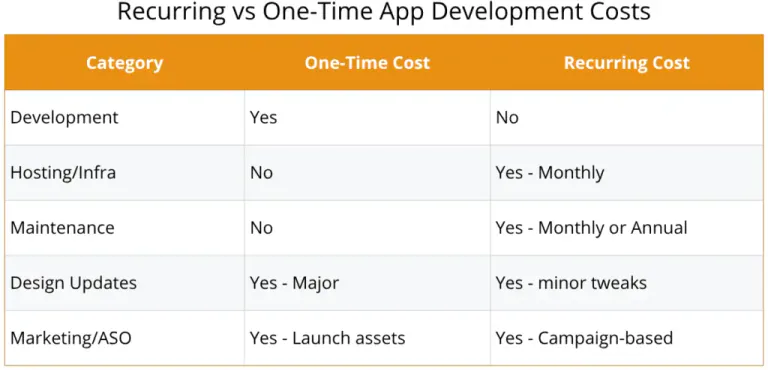
Recurring vs One-Time App Development Costs
Here’s a simplified breakdown:
Budget Exercise
Now that you’ve taken a look at some industry-standard figures, how about running a quick and realistic estimation? To plan effectively, break your budget into three distinct phases:
- Build (60% - 70%)
This is the main development phase where the app is scoped, designed, developed, tested, and made ready for launch. It includes:
- Discovery sessions and planning workshops
- UX/UI design
- Frontend and backend development
- QA testing
- App Store submission and deployment
- Project management
Pro Tip: Avoid overspending here by using a focused MVP scope. Keep “nice-to-have” features on a roadmap.
- Launch (10% - 20%)
These are your go-to-market costs. Many teams underestimate how much it takes to convert early adopters:
- App Store Optimization (ASO)
- Landing page creation
- App preview videos/screenshots
- PR, influencer outreach, and/or paid ads
- Onboarding campaigns or tutorial content
- Beta testing feedback loops
Warning: Launching without marketing support is like throwing a party and forgetting to invite anyone; no one will come to your lavish party!
- Scale (15% - 25%)
After launch, your app enters the growth phase. Costs here are often ongoing and tied to performance, feature expansion, and user retention:
- Feature iteration based on user feedback
- Bug fixes and OS compatibility updates
- Analytics and data dashboards
- Hosting and cloud services
- Support tickets or moderation
- Growth campaigns, A/B testing, push notifications
Smart Move: Budget at least 12 months of post-launch runway so you can learn, improve, and scale with confidence.
You can use a chart like this one to fill in the blanks based on your own app goals and timeline:
Why Post-Launch Is Where the Real Work Begins
Launching is just the midpoint. You’ll need ongoing iteration, feature requests, bug fixes, OS version compatibility updates, and marketing to acquire and retain users. Allocate the recommended 15–25% number previously mentioned annually for maintenance and evolution.
Long-Term Strategy Tip:
Treat your app like a product, not a project. Great apps are never really done.
Not sure where to start? A strategy session can clarify your roadmap.
How Your Development Partner Impacts the Final Cost (and Outcome)
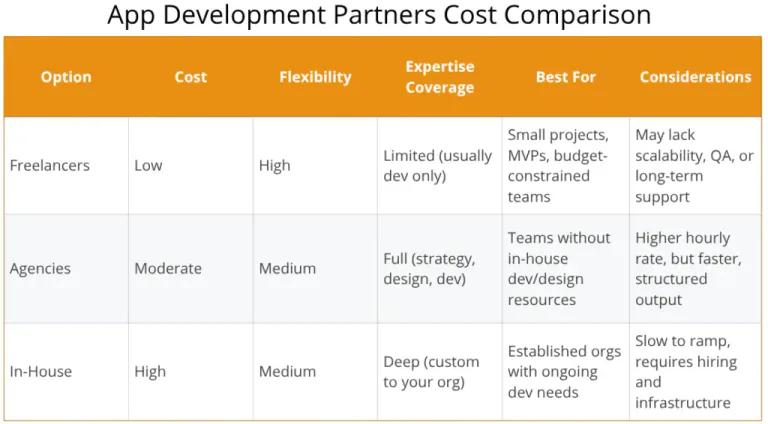
Freelancers vs Agencies vs In-House Teams
Each of these options has pros and cons, though agencies tend to have more pros than cons.
Freelancers are typically the most cost-effective and flexible option, making them ideal for small projects or early-stage MVPs. They are also a viable option for teams with tight budgets. They excel when the scope is well defined and limited to development work. However, freelancers often lack a wide range of skills required for more complex apps such as product strategy, UX/UI design, QA testing, and post-launch support, making them a risky choice for long-term or enterprise-grade builds.
Agencies provide a full service, often including strategy, design, development, quality assurance, and even marketing support. This makes them a strong choice for teams without in-house product or engineering capacity. While agencies usually come at a higher hourly rate than freelancers, their structure, cross-functional collaboration, and process maturity can reduce time-to-market and help avoid costly mistakes. They're best suited for organizations seeking end-to-end support with defined milestones because as organizations grow, so does the agency, so it’s in their best interest to provide the best quality of work possible.
In-House Teams offer the highest level of control, alignment with company goals, and deep product knowledge over time. This makes them ideal for established companies with ongoing development needs and the resources to invest in long-term product growth. However, hiring, onboarding, managing, and retaining a team can be extremely expensive and slow, even for organizations with large budgets. The upfront costs and time commitments are significant, so this path is usually best for organizations planning to maintain and evolve a product internally over many years.
To summarize:
How to Evaluate an App Development Company
Make a checklist out of these questions and keep it handy when meeting with a dev team:
- What’s their process from discovery to launch?
- Do they support cross-platform and modern stacks?
- Can they show examples of successful launches?
- How do they handle QA and maintenance?
- Are they a certified partner (i.e., Ionic Trusted Partner)?
Why Custom App Development Often Wins Long-Term
Custom apps give you complete control over how your product behaves. They're designed to align directly with your business model and long-term vision. A custom build ensures the solution fits like a glove and not like an off-the-shelf workaround.
While drag-and-drop tools and no-code platforms (like Bubble, Glide, or Adalo) can be helpful for prototyping or launching MVPs quickly, they come with real limitations. You're constrained by their feature sets, performance ceilings, integration options, and update schedules. You may also face vendor lock-in, meaning migrating your data or app elsewhere in the future could be expensive or impossible. These tools are great for testing ideas or internal-use tools but they rarely scale well when you’re ready for primetime.
Custom development, on the other hand, enables full integration with the systems you already use, optimized performance for your specific audience, and the flexibility to pivot or evolve without starting over. Most importantly, you own the code! You also own the logic, and the long-term value.
Validation Time: Is Custom Development Right for You?
Answer the following questions honestly:
- Will your app need to serve thousands (or millions) of users eventually?
- Will you need to connect to external services like CRMs, payment processors, or proprietary databases?
- Is the user experience (UX) part of your competitive advantage?
- Do you plan to build new features or evolve your product post-launch?
- Is data privacy, compliance (e.g., HIPAA, GDPR), or security a critical factor?
If you answered “yes” to 3 or more of these, custom development is likely the smarter investment.
In short, custom apps are about building something that can actually last, grow, and adapt, not just about building something from scratch. They’re an investment in long-term ROI, scalability, and control.
Glossary of Key Terms
- MVP: Minimum Viable Product
- ASO: App Store Optimization
- QA: Quality Assurance
- API: Application Programming Interface
- UX/UI: User Experience / User Interface
- Cross-Platform: Single codebase for multiple OSs (iOS, Android)
- Native App: Separate codebases for iOS and Android