Schedule a Free Demo Schedule a Free Demo Schedule a Free Demo TALK TO AN EXPERT 1. How do you test a mobile app? 2. What are the different types of mobile app testing? 3. Why is mobile application testing important?
Most AI features don’t fail because the model is bad. They fail because real users never behave like test data.
Once an AI feature ships, users ask the wrong questions, push edge cases, and trust outputs more than they should. That’s where things break. A chatbot hallucinates policy details, a recommendation system amplifies bias, and an automated decision makes a call no human would sign off on.
And the impact is rarely small.
- Trust drops fast: 71% of users say they lose confidence in a product after a single incorrect AI response
- Legal risk is real: Air Canada was held liable when its chatbot gave customers incorrect refund guidance
- App store and brand fallout follow: AI-driven chatbots have led to public backlash, forced rollbacks, and emergency shutdowns within days of launch
The model may be technically “accurate.” But if it fails in real-world scenarios, the cost manifests as churn, compliance issues, and reputation damage.
That’s why mobile app testing of AI features is necessary. It focuses on how humans actually use (and misuse) AI in production.
Table of Contents
Why AI Mobile App Testing is Different From Traditional App QA
Artificial intelligence mobile application testing is different from traditional QA in the following ways:
Understanding Probabilistic vs Deterministic Behavior
Traditional software QA testing works with one rule: the same input leads to the same output. But modern AI was never built on fixed rules. Modern artificial intelligence app features are probabilistic. Give an AI the same input twice, and you don’t always get the same answer back. Small shifts in context, timing, or underlying data can nudge the response in a different direction.
The unpredictability makes traditional pass-or-fail testing fall apart. Your team never falls behind on rigorous checks because they think in terms of range, patterns, and real-world scenarios. This is much closer to how humans evaluate judgment than how they test code.
Example: A search query sent to an LLM-powered help feature of a fintech app returns different responses each time. All responses are plausible, but not identical, which otherwise would be flagged as a “failure” in a traditional test suite.
What Does this Mean for Test Case Design?
You can no longer write pure “input” or “expected” test cases. Your mobile app testing tools must define acceptable behavior boundaries (e.g., factual accuracy thresholds, response appropriateness, confidence bounds) and use methods such as metamorphic testing or statistical validation to assess consistency and variance, unlike traditional QA.
Data Quality and Training Bias Risks
How Biased or Incomplete Data Causes AI Failures in Production
AI doesn’t make decisions in a vacuum. It learns from what we feed it. So when the data is narrow, incomplete, or shaped by existing biases, those same limitations quietly make their way into the output.
You see this clearly with language models trained mostly on English-heavy sources. When someone asks a question from a different cultural or linguistic context, the response can feel off, oversimplified, or missing the nuance a human would naturally catch.
The Gap Between Training Data and Real User Data
Training sets rarely mirror the full spectrum of real-world users. Real user behavior, regional dialects, slang, edge contexts, and accessibility requirements may or may not be a part of your datasets. This leads to failures that never appeared in testing but surface quickly after launch, reducing user trust.
UX, Trust, and Explainability as QA Factors
When Technically Correct AI Still Feels Wrong to Users
Even if a model is statistically accurate, will users trust its decisions if they don’t understand them? This comes from the “black box” nature of many AI systems. As internal logic is invisible to users, building confidence and transparency is a challenge.
Why Confidence, Timing, and Transparency Matter
Trust isn’t about what the AI says, it’s about how it says:
- Confidence scores help users understand the reliability of a recommendation.
- Response timing and tone affect whether users feel guided or confused.
- Explainability helps users understand why a decision was made, reducing fear of “mysterious” automation.
Without these UX factors baked into QA, technically correct AI can feel wrong, leading to churn, support escalations, and misuse outcomes that traditional QA never had to validate.
Get expert support to launch, scale, and test your mobile app
How to QA Test AI Features Before Launching Your App
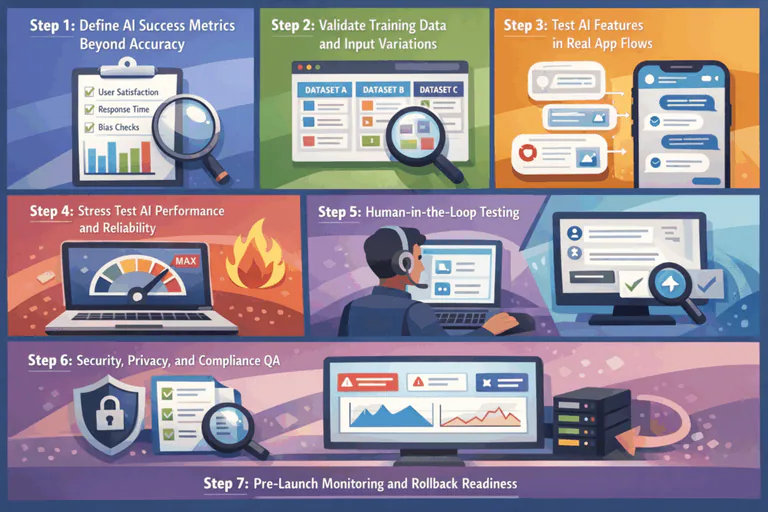
Step 1: Define AI Success Metrics Beyond Accuracy
Accuracy is a starting point. AI features make probabilistic decisions, and users feel those decisions long before they ever see a percentage score. Your success metrics need to reflect confidence and impact.
When defining AI success metrics, ask:
- How often is it confidently wrong?
- When confidence drops, does behavior change?
- Are low-confidence predictions handled safely?
- Does this reduce user effort?
- Does it speed up decisions?
- Does it lower support tickets or increase task completion?
For example, a recommendation engine with high recall but low precision may surface something every time, but users lose trust when suggestions feel random or irrelevant.
Step 2: Validate Training Data and Input Variations
Most AI failures never happen in production because of code. They happen because the data doesn’t represent reality.
QA teams should review:
- Who is overrepresented or underrepresented in training data?
- Are certain accents, writing styles, devices, or usage patterns missing?
- Do outputs vary unfairly across demographics or contexts?
- What happens when inputs are incomplete?
- Does the model fail gracefully or confidently hallucinate?
- Are edge cases ignored, misclassified, or escalated?
Step 3: Test AI Features in Real App Flows
AI fails when it feels out of place inside the product. Users don’t experience models. They experience screens, buttons, delays, and moments where the app either helps or gets in the way. QA needs to test AI exactly where it lives, inside real flows.
AI software testing tools should go beyond ideal, linear journeys. Real users hesitate, change their minds, and do things out of order. Inputs can be unclear, incomplete, or interrupted midway. AI features need to behave sensibly in those moments.
When testing AI inside real app flows, QA should focus on whether the experience holds up under real behavior:
- Does the AI adapt when the user intent isn’t clear or changes mid-flow?
- Does it pause, ask for clarification, or step back when confidence drops?
- Does the system acknowledge missing or imperfect input instead of guessing?
- Are users guided forward with clear, calm prompts rather than forced outcomes?
- Is uncertainty made visible in the interface, not hidden behind confident responses?
- Do fallbacks feel intentional and helpful, not like silent failures?
Step 4: Stress Test AI Performance and Reliability
AI features earn trust when they stay steady as usage grows and conditions change.
Stress testing helps you understand how AI behaves at scale and how well it supports the app experience during high demand. QA looks at consistency, responsiveness, and composure under load.
When stress testing AI features, QA should focus on how the system performs as pressure increases:
- Response times remain smooth and predictable as concurrent usage grows
- Output quality stays consistent during peak traffic
- Timeouts and retries are handled cleanly within the user experience
- Fallback logic activates smoothly to maintain continuity
- Messaging stays clear and reassuring when the system adjusts behavior
- Core app flows remain responsive and uninterrupted.
Wondering what mobile app testing of AI features really looks like?
Step 5: Human-in-the-Loop Testing
AI works best when it knows when to step forward and when to step back.
Human-in-the-loop testing focuses on those handoff moments. It ensures the system supports people instead of replacing judgment where context, nuance, or accountability matters.
QA should validate how confidently and clearly the AI involves humans in the process:
- The AI escalates decisions when confidence drops or context becomes sensitive
- Review points feel intentional
- Users understand why input or confirmation is needed
- Manual overrides are easy to access and simple to use
- Fallback paths feel supportive and controlled
You need mobile app testing services to add a human in the loop and make AI feel collaborative.
Step 6: Security, Privacy, and Compliance QA
Trust grows when users feel safe without having to think about it. Security and privacy testing ensure AI features handle data responsibly and transparently across every interaction.
Key areas to validate include:
- Sensitive data is handled thoughtfully across inputs, processing, and outputs
- Personal information remains protected throughout the AI workflow
- Data usage aligns clearly with user expectations and disclosures
- Consent and transparency are reflected naturally in the experience
- Regional and platform guidelines are met smoothly and consistently
Well-tested AI respects boundaries by design. Users feel informed, protected, and in control without friction.
Step 7: Pre-Launch Monitoring and Rollback Readiness
Launching AI is a transition. Pre-launch readiness ensures teams stay responsive once real users arrive. QA helps confirm that AI features can be introduced gradually, observed, and adjusted with confidence.
Before launch, teams should confirm:
- Feature flags support controlled, staged rollouts
- User segments can be monitored independently
- Performance and behavior signals are visible and easy to track
- Adjustments can be made quickly without disrupting core flows
- Rollbacks feel clean, intentional, and well-coordinated
Want to explore solutions tailored to your team?
How Openforge Helps Teams QA AI Features Before Launch
Apart from being an AI app builder, Openforge helps teams QA AI features. They focus on how those features behave in real products and test environments. The team works with product and engineering stakeholders to define practical success criteria, test AI inside real app flows, and validate performance, trust, and control before launch.
By combining structured and automated QA processes with an understanding of user behavior, Openforge ensures AI features are reliable, intentional, and ready for real-world use from day one.
When AI Meets Real Users, QA Matters Most
AI features earn trust in the moments after launch, when real users push boundaries your test data never did. QA that accounts for uncertainty, scale, and human behavior is what separates reliable AI from risky automation.
If your team wants to ship AI features that feel intentional, steady, and safe in production, Openforge can help. Talk to the Openforge team to QA your AI features with real-world use in mind, before your users do it for you.
Frequently Asked Questions
By validating functionality, performance, security, and user experience across real devices, operating systems, and real-world usage scenarios.
They include functional testing, usability testing, performance testing, security testing, compatibility testing, and regression testing.
Mobile app testing ensures the app works reliably for real users, protects data, meets platform requirements, and prevents costly failures after launch.